Branching, committing, pulling, and merging discipline. The basics that let multiple people, and multiple agents, work in parallel without losing each other's work.
If the project is the building, GitHub is the keys. Lose the keys, lose the building.
More importantly, GitHub is what makes multi-agent and multi-human collaboration possible. Without it, every change overwrites someone else's, every what-changed question takes ten minutes, every rollback is a panic.
The picture
The mental model
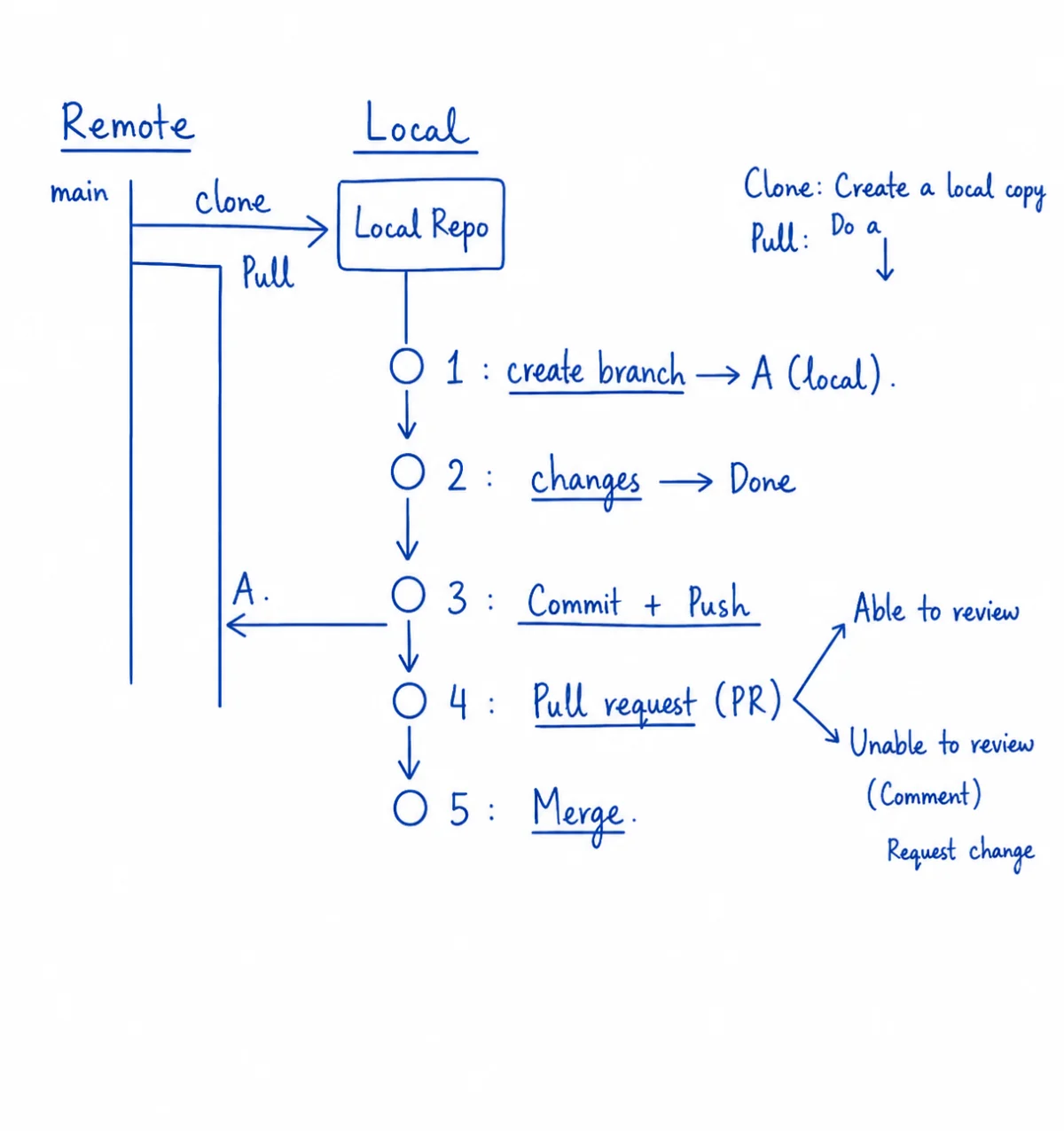
Remote is the source of truth, local is your sandbox. Clone creates the sandbox, pull keeps it in sync, push sends finished work back. A pull request is asking someone else to pull your branch into main, because you can't ask yourself for the check. Merge is the moment it goes live.
Even excited builders need an engineer. The check-in exists so going fast doesn't mean shipping broken work.
The teaching
What this actually is
The five operations you need (no more)
You do not need to be a Git wizard. You need five operations, executed cleanly, every time. Beyond these five, you can stay in dangerous-water territory for a long time without ever drowning.
Commit
Save a snapshot with a message. One concept per commit. If you cannot describe the last change in one sentence, your commit was too big.
Push
Send your local snapshots to GitHub. Until you push, only your laptop has them.
Pull
Pull the latest snapshots from GitHub before you start. The single most common cause of merge pain is starting from stale code.
Branch
A parallel line of work that does not affect main yet. Branch when the change is risky, or when more than one person (or agent) is editing.
Merge
Bring a branch back into main. Done well, it is a one-click action. Done badly, it is the moment work disappears.
The discipline (the part most people skip)
The five operations are easy. The discipline of using them well is what separates a team that ships from a team that constantly recovers.
Commit early, commit often
A commit is free. Take one every time you finish a small thing. Five small commits beat one big one every time.
Pull before you start
Five seconds before the work begins. Saves an hour of recovery later.
Branch when the change is risky
Anything experimental, anything you might throw away, anything where two people will collide.
Never force-push to main
Force-push rewrites history. On a shared branch, it silently overwrites your teammates' work.
The multi-agent corollary
GitHub is what makes multi-agent and multi-human collaboration possible. Two agents cannot edit the same file at the same time. Branches let them work in parallel without colliding.
When the developer agent and the writer agent both want to edit the homepage, you put each on its own branch. They each commit. You merge in turn. No one overwrites anyone.
Try it yourself25 minutes
Run the full daily flow, plus one merge conflict, in 25 minutes
Use the Hello World repo from Protocol 02 (or any small repo you own). You will branch, commit, push, merge, then deliberately create a merge conflict to learn how it feels in safety.
Step 01
Pull, then branch
git pull. Then git checkout -b experiment/badge. You are now on a parallel line of work.
Step 02
Make a change on the branch
Add a small badge or note to the homepage. Tell Claude or do it by hand.
Step 03
Commit and push the branch
git add and git commit -m "add badge". Then git push -u origin experiment/badge.
Step 04
Open a PR and merge it
On GitHub, open a PR from your branch to main. Click Merge. Confirm the change is live on main.
Step 05
Create a conflict on purpose
On main, change the headline. On a new branch (experiment/badge-2), change the same line to something else. Push both. Try to merge. GitHub will refuse and show you the conflict.
Step 06
Resolve the conflict
Open the file in your editor. Choose which version wins, or combine them. Commit the resolution. Merge. The conflict is gone. The next one will not scare you.
Outcome
The five operations live in your daily flow. The first merge conflict is behind you, in safety. Future merge conflicts feel like a Tuesday, not a crisis.